

In October 2021, the UK food industry changed permanently.
Natasha’s Law, the Food Information Amendment requiring full ingredient and allergen labelling on all food prepackaged for direct sale, came into force, and businesses that weren’t ready faced some uncomfortable choices very quickly.
Five years on, you might assume compliance is no longer much of a conversation, but allergy-related incidents and recalls continue to make headlines.
People continue to be seriously harmed, and in some cases killed, because allergen information was missing or processes were simply not followed.
So whether you’re refreshing your understanding of what Natasha’s Law actually requires, or you’re reviewing whether your current processes are genuinely fit for purpose, this is worth a read.
The story behind the law
Natasha Ednan-Laperouse was 15 years old when she died in 2016 after eating a pre-packed baguette from Pret a Manger at Heathrow Airport. She had a severe sesame allergy and carefully checked the label, as well as double-checking with staff that sesame wasn’t present. The sesame that killed her was baked into the bread, but it wasn’t listed on the label because it didn’t need to be.
The inquest into her death exposed a significant loophole in UK food labelling law: businesses making and selling fresh products prepacked on their own premises were not required to provide allergen information on the packaging itself. Verbal communication, like asking staff and checking boards, was considered sufficient.
Natasha’s parents, Nadim and Tanya, campaigned tirelessly for change. The result was the Food Information Amendment – Natasha’s Law, which closed that loophole and introduced mandatory full ingredient and allergen labelling for all pre-packaged for direct sale (PPDS) food.
Tragically, Natasha’s case was not the last of its kind. In 2020, James Atkinson, a 23-year-old student with a severe peanut allergy, died after ordering a pizza through Deliveroo in Newcastle. A subsequent investigation found that the restaurant had left the allergen sections in its food safety documents completely blank.
What Natasha’s Law actually requires
The law applies specifically to food that is pre-packed for direct sale (PPDS), or food that is packaged on the same premises where it is sold or offered to customers. That includes:
- Pre-prepared sandwiches, baguettes, wraps and salads
- Pre-wrapped items kept behind a counter
- Pasta pots, sushi, pastries and similar grab-and-go products
- Some food sold from mobile or temporary outlets
It doesn’t cover food that is packaged elsewhere and delivered to the site (that falls under pre-packed food rules), or food prepared and served directly to the customer without pre-packaging.
For PPDS food, the label must include:
- The name of the food
- A full ingredients list, ordered by weight (greatest first)
- All 14 major allergens clearly emphasised in bold, italics, capitals, or a contrasting colour
The 14 major allergens covered are: celery, cereals containing gluten, crustaceans, eggs, fish, lupin, milk, molluscs, mustard, tree nuts, peanuts, sesame, soya, and sulphur dioxide/sulphites.
Who it affects
Natasha’s Law has broad reach and the businesses it affects aren’t only the obvious ones. Yes, sandwich shops and cafes are squarely in scope. But so are:
- School and hospital catering operations
- Contract catering companies
- Supermarket counters and in-store bakeries
- Hotel and leisure catering
- Food service operations within larger facilities management contracts
If your operation produces any PPDS food, even as part of a broader service, you’re in scope. If your operation runs across several sites the compliance burden multiplies fast.
When recipes or suppliers change, so should your label
Most food businesses understood what Natasha’s Law required when it came in. The part that a lot of businesses have struggled with since then is keeping up with change.
When recipes change, or you switch suppliers (or they switch ingredients) everything needs to be reviewed. Similarly, seasonal menus or rotation can also throw a spanner in the works. Any one of those moments is a potential compliance risk and, in most operations, the systems designed to catch them are still fundamentally manual.
It’s rare that teams are deliberately negligent or cutting corners, but through the ordinary friction of busy kitchens and high staff turnover, consistency can be the first thing to slip. The restaurant in the James Atkinson case didn’t leave allergen sections blank out of malice, but because the process broke down.
For larger or multi-site operations, the stakes are higher and the margin for error is thinner.
How to comply with Natasha’s Law: a practical checklist for food businesses
There are a few foundational areas that every food business should have locked down and should be actively maintaining:
Supplier relationships and ingredient visibility
You can only label accurately if you know exactly what’s in your ingredients.
Active, ongoing communication with suppliers is central to this. When a supplier reformulates a product (which happens more often than most businesses realise), you need a process in place that means you know about it immediately.
The risk and compliance burden here is on the business selling the pre-packaged food and not the ingredient supplier, so make sure you’ve got a process in place as the supplier isn’t obliged to offer one up.
Label production that scales
Handwritten labels are not a scalable solution.
You need to be able to produce accurate, consistent labels across every PPDS item.
The answer depends on the scale of your operation but it almost certainly involves a combination of specialist labelling software and a digital management layer that keeps ingredient data current and consistent.
Staff training that actually sticks
Every person who touches the food preparation and labelling process needs to understand what they’re responsible for and what happens when something changes.
In high-turnover environments, that training can’t be a one-off induction. It needs to be embedded in day-to-day workflows, with clear escalation paths when a new ingredient or recipe is introduced.
Audit trails that prove compliance
If something goes wrong, ‘we trained our staff’ and ‘we update our labels regularly’ aren’t enough without evidence.
Businesses need digital records that show who confirmed what, particularly when recipes change or new items are added to the menu. In a serious incident, an auditable compliance trail will be crucial to find out what went wrong and protect your business.
Where technology fits in
Specialist food management and labelling software is the most effective way to keep allergen and ingredient data accurate at scale.
Many solutions will automatically propagate changes across your systems when a recipe or ingredient is updated, removing the risk of a label being printed from outdated information.
Beyond labelling, digital workflow and compliance platforms can help food businesses make sure policies are implemented consistently. Digital checklists and logbooks help you to confirm staff have read and understood a recipe change. Automated alerts that trigger when a process step is missed help you to move fast and contain potential problems before they spread.
mpro5 works with food businesses and contract caterers to build exactly these kinds of compliance workflows. turning what can feel like a huge administrative burden into an operationally embedded process that protects both customers and the business.
The bottom line
Natasha’s Law has been in force since October 2021. The legislation is not new but the compliance challenge is ongoing, and for multi-site food operations, it’s one of the more operationally complex things you’ll manage.
The businesses that get this right are the ones with the best processes, who understand that the stakes of getting it wrong are about as high as they get.
If you’d like to understand how mpro5 can help your food operation maintain Natasha’s Law compliance at scale, book a demo and we’ll show you how it works in practice.
Learning and Rectification Tasks
Operational learning often happens away from the work it supports.
Whether it’s in a classroom or e-learning via a platform your teams log into – training and its associated tech have long been treated as a category of their own, tacked on rather than built in.
For frontline staff, this creates a disconnect between what they’ve learned and when they actually need it. And for leaders, it’s difficult to see the full picture of who is qualified to do what across all sites.
This release changes that.
Bringing operational learning together with the work
From June 2026, mpro5 customers can build and deliver operational learning directly inside the app, on the same device your teams already use to run their shift.
You can build modules from videos, documents, acknowledgements and sign-offs, group them into courses and assign them automatically by role, so the right training reaches the right person without any manual admin.
Completing a module awards a certification and the full completion record, timestamped and tied to a specific version of the content, exists automatically, in the same place as the rest of your operational data.
Leaders benefit from seeing a clear, real-time picture of who’s completed what and who’s certified to do which tasks, without spending hours searching for data in a different system.
For your frontline teams, structured learning can now be done wherever they are, with a record that’s stored in-context with the work.
When something changes (and something always changes) just update the module, republish, and the history of what came before is preserved. You’ll know your teams’ learning is always up to date and easily see the gaps you need to close – so no scrambling when an audit arrives.
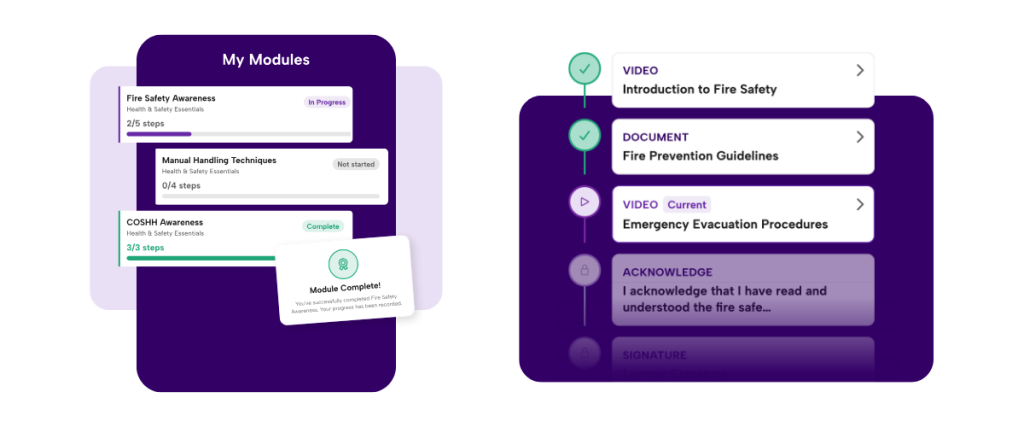
The difference this makes in practice:
- Higher completion rates. Keeping learning where the work happens means it gets done without additional systems or login fatigue.
- Faster inductions. New starters are assigned the right modules from day one and certified before they go operational.
- Audit-ready records. Everything is tracked automatically. Say goodbye to spreadsheets and constantly chasing for updates.
- Always current. Re-version modules as things change, with the full history kept for audit.
This works for operational learning, compliance training, inductions and policy updates alike. If you need to train staff and prove that you’ve done it – that can now happen in mpro5.
Rectification Tasks – put it right and prove it was done
Also shipping in June: Rectification Tasks, available as part of the Task Management module.
When something gets flagged during a check, for example a missed check or something non-compliant, the resulting task now appears in the same list as scheduled work.
Clearly marked as a follow-up, with a deadline and assigned the right level of urgency. The check that created it travels with it, so whoever picks it up has the full context without having to go digging.
How rectifications behave is set through templates: simple, reusable rules that define who’s responsible, how urgent the task is and how long there is to resolve it.
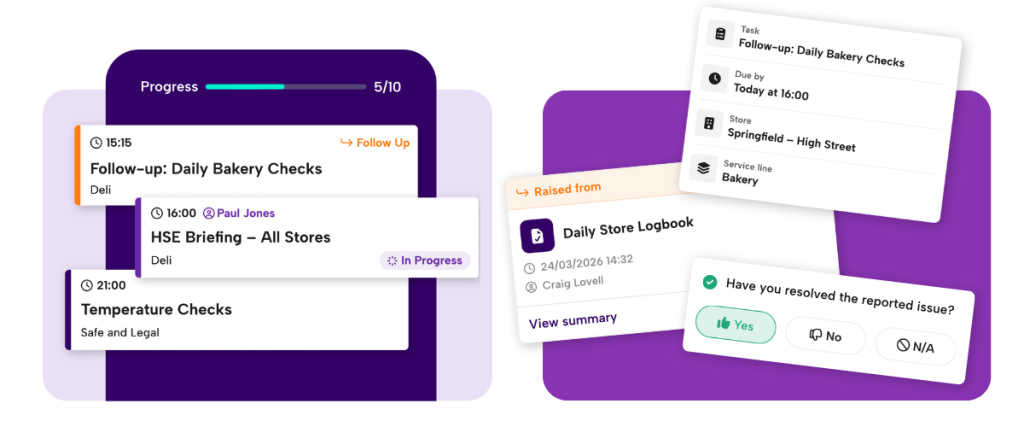
The same check can route to different rectifications depending on what was flagged, so the response always fits the situation, whether that’s a store audit flagging missing allergen labelling, an inspection identifying a health and safety hazard or a compliance check requiring sign-off.
The result is one task list that gives teams the full picture: scheduled work, initiative tasks, and follow-ups, all in the same place. Issues get actioned as part of the day rather than falling into a separate process that nobody owns.
Both features are live now for mpro5 customers. If you’d like to talk through what these new features look like for your operation, get in touch.
Why visibility and digital audit trails are your first line of defence against serious dust breaches.
Dust. It’s present in almost every food production environment that handles dry ingredients and carries a number of risks beyond simply keeping things clean.
A recent Health & Safety Executive (HSE) inspection drive targeting bakeries and a string of enforcement actions and compensation claims against food manufacturers, make clear that regulators are treating dust as a risk. One that businesses are legally required to control, and will be held to account for if they don’t.
The risks are serious, and legally defined
The health consequences of uncontrolled dust exposure are well-documented. Flour, grain, spices, dried milk, instant coffee and potato powder are all recognised hazards. Prolonged exposure to flour dust, for instance, is a leading cause of occupational asthma, a condition that can be permanent and the basis for compensation claims running into hundreds of thousands of pounds.
The legal framework is equally clear. The Control of Substances Hazardous to Health Regulations 2002 (COSHH) requires employers to prevent or adequately control exposure to harmful dust. Specific Workplace Exposure Limits (WELs) apply to recognised hazards like flour, and are published in the HSE’s EH40/2005 guidance – a document that food manufacturers are expected to monitor as limits are updated.
Beyond health, dust presents an explosion risk. The Dangerous Substances and Explosive Atmospheres Regulations 2002 (DSEAR) govern the management of combustible dusts, (a category that includes flour, sugar, and instant coffee) where the wrong concentration, combined with an ignition source as minor as static electricity, can have catastrophic consequences.
In 2018 an English bakery was fined over £150,000 for dust control failures, cited as insufficient ventilation, cleaning processes that generated more airborne dust than it removed and a health surveillance programme that didn’t meet the required standard.
The invisible gaps that increase dust safety risk
What makes dust risk so persistent is the speed with which it accumulates on surfaces in between cleaning cycles. This compounds when the routines designed to manage it are inconsistently applied, not properly recorded, or simply assumed to be happening when they’re not.
This is where many food manufacturers are most exposed. When schedules and processes exist as documents rather than live workflows with evidence it’s hard to know whether the standard has been upheld until something goes wrong.
Without accurate data that can be checked and verified in minutes of a safety request, something as small as dust could leave a huge compliance hole in your food safety operation.
mpro5 CRO Fred Whipp demonstrates the automated processes that protect your business against compliance fines
Designing a dust-controlled environment with mpro5
At mpro5, we work with food and drink businesses to close the gap between what processes say should happen and what can be proven to have happened.
For dust risk specifically, that means making the critical controls like cleaning, ventilation maintenance, health surveillance and risk assessment into structured digital workflows rather than paper-based assumptions.
Scheduled cleaning checks
Cleaning routines can be configured as recurring digital tasks, assigned to specific team members at defined frequencies.
Completion is logged in real time, with the ability to upload photographic evidence and flag exceptions. If a check isn’t completed, managers are alerted immediately, so no surprises at the next audit.
Ventilation and equipment maintenance
Planned preventive maintenance (PPM) schedules for extraction and ventilation systems can be managed within the platform, with automatic reminders and digital sign-off.
The kind of ventilation failure that led to the £150,000 fine becomes far harder to miss when maintenance is tracked against a live schedule rather than a paper log or buried in a spreadsheet.
Health surveillance records
Tracking which employees have completed required health surveillance, when it’s due for renewal, and whether any concerns have been flagged can be centralised and automated. No more relying on a spreadsheet that someone last updated six months ago.
COSHH documentation and risk assessment workflows
Risk assessments can be stored, reviewed and updated within the platform, with version control and audit trails that show ongoing management rather than a one-time exercise.
Corrective action tracking
When a check flags an issue, whether it’s elevated dust levels, a faulty extraction unit, a missed surveillance appointment, the platform triggers a corrective action workflow, assigning responsibility, setting a deadline and chasing until it’s resolved.
Training records
Ensuring that employees handling hazardous dust understand the risks, the controls and their own responsibilities is itself a COSHH requirement. mpro5’s training management capability lets businesses track who has been trained on what, and when, and flag knowledge gaps before they become liabilities.
What being ‘audit ready’ means in reality
The bakery case cited in Food Manufacture included a damning finding: the employee responsible for health and safety compliance didn’t have sufficient experience to properly assess the risks. That’s a training and oversight failure as much as a technical one.
When the HSE arrives, whether as part of a proactive inspection drive or following an incident, being truly audit ready means being able to demonstrate, with timestamped records, that your controls were in place and consistently applied. That they are regularly reviewed, rather than buried in a shared drive. And that ongoing training and oversight is applied.
mpro5 gives food and drink manufacturers that capability: a centralised, real-time record of every safety-critical action across every site, plus training records and sign offs – accessible at any point and fully exportable for audits.
Having a digital process doesn’t eliminate dust. But it does eliminate the blind spots and in a regulatory environment where the HSE is actively inspecting, and where the consequences of failure include six-figure fines, permanent employee health damage or significant reputational harm, that visibility isn’t optional.
mpro5 helps food and drink manufacturers build structured, audit-ready workflows across health and safety, cleaning, maintenance and compliance processes. To find out how we can help you manage risk and stay inspection-ready, get in touch with our team.
Running communications across a distributed workforce has never been simple, and the stakes keep rising.
When teams are more spread out, with complex shift patterns, you need the assurance that your platform can keep up with expectations around accountability and audit-readiness. When something goes wrong, “we sent the message” will rarely be good enough.
That’s why our latest mpro5 release focuses on one clear goal: making sure the right people receive the right information and giving you the confidence to prove it.
This release brings together a new way to share team communications, in-context collaboration on tasks, formal sign-off for critical content, plus a role-based structure that ensures actions always land with the right person.
Why this release, and why now?
Most organisations running multi-location operations face the challenge of knowing whether communications actually reached the right people, and whether anything was done about it.
Customers told us they were struggling with:
- Updates shared over email or WhatsApp with no visibility of who had seen them
- No reliable way to confirm that critical information like recalls, policy changes or compliance updates had been formally acknowledged
- Tasks landing with the wrong people, or being missed entirely, because role structures weren’t reflected in the system
- Conversations about work happening outside the work, invisible and untraceable
This release closes those gaps by bringing communication, accountability and structure directly into the flow of work.
Posts: keep everyone informed, in one place
Operational conversations deserve better than a group chat.
Posts gives teams a forum and news feed experience inside mpro5. A place to share updates, run ongoing discussions and keep colleagues informed without relying on external tools.
Whether it’s a shift handover, a company announcement or a question from the shop floor, it stays visible and searchable for the people who need it.
Posts work well for:
- Shift handovers: Share essential information between shifts so nothing gets missed and teams stay aligned.
- Company news and announcements: Communicate updates, policy changes or events in a place everyone can find.
- Ongoing team discussions: Keep conversations about projects, safety or promotions in one place, with full history.
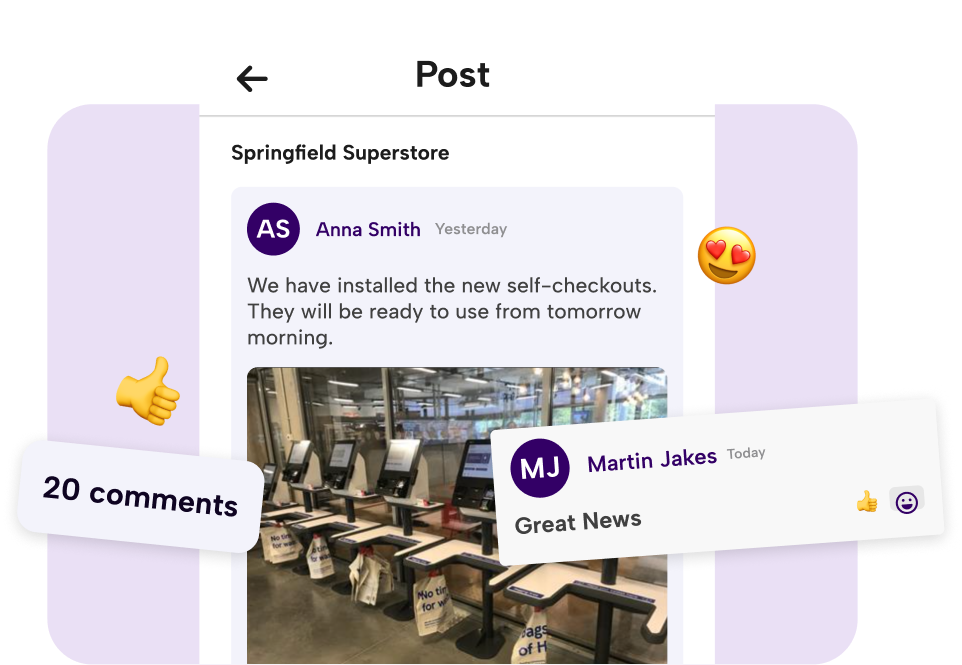
Task Comments: resolve issues where the work happens
Resolve questions and blockers faster with Task Comments, by bringing the discussion directly onto the task itself.
Teams can ask questions, share guidance, attach files and clarify instructions without leaving mpro5, keeping context intact and resolving issues quickly. Every conversation is visible to managers as it happens, and fully traceable for training and audit afterwards.
Task Comments are great for:
- Product recalls: Teams confirm actions, share evidence and flag any issues directly on the task, with managers tracking progress in real time.
- Campaign rollouts: Guidance and images live alongside the task, so standards are met consistently across every site.
- Training and briefings: Attach documentation, answer questions in context and track acknowledgements and completions without switching tools.
- Operational updates: Communicate urgent changes and ensure immediate visibility across all relevant teams.
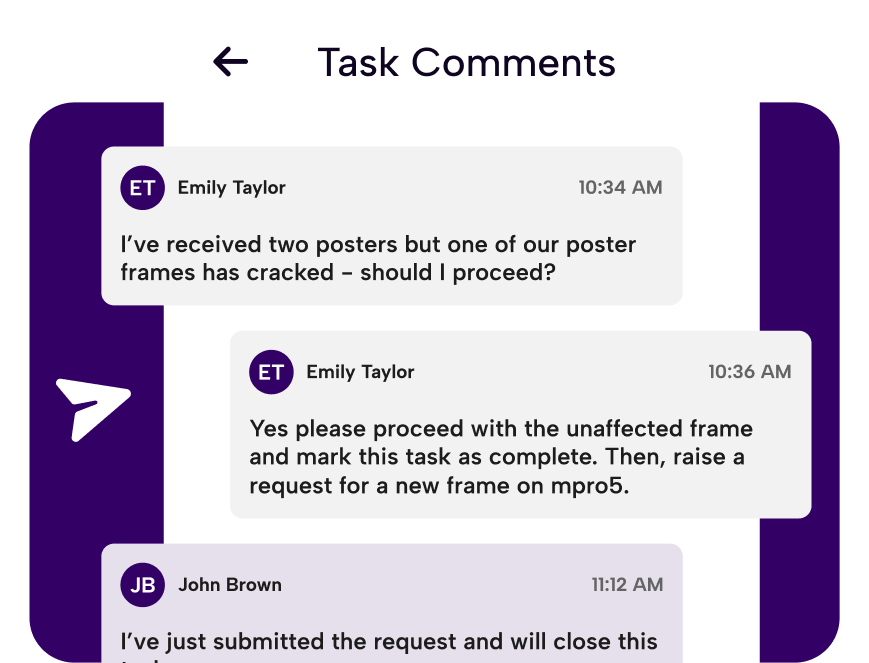
Initiatives with Sign-off: from sent to proven
For critical communications, marking something complete isn’t enough.
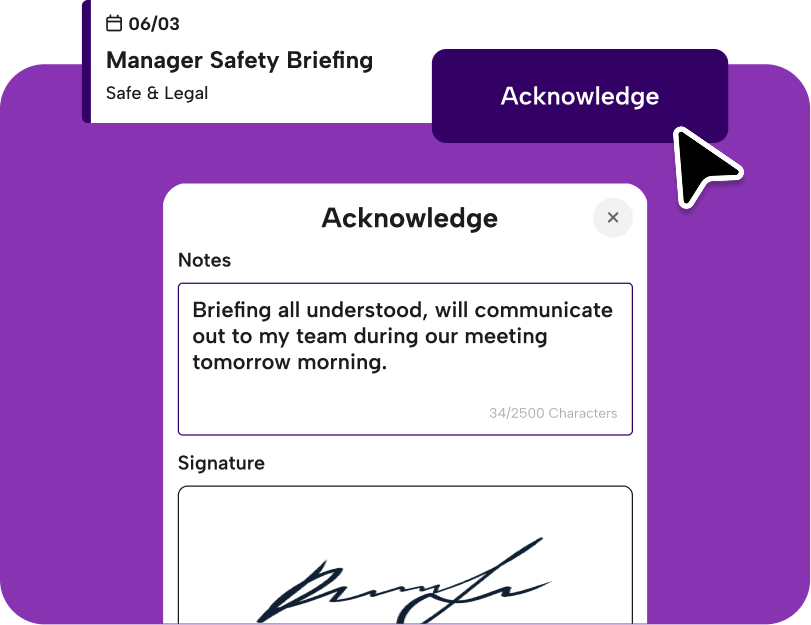
Initiatives with Sign-off adds a mandatory signature step before a task can be closed. Named individuals formally confirm they have read and understood the content, creating a clear, auditable record stored centrally and ready the moment you need it.
It’s the difference between “we told them” and “we can prove it.”
Sign-off is built for:
- Safety recalls: Secure formal confirmation before operations continue.
- Policy changes: Capture acknowledgement of updated procedures with a verifiable record.
- Compliance updates: Evidence acceptance of regulatory communications at every level.
- Urgent directives: Formalise receipt of critical instructions by the right person.
Hierarchy Roles: the right action to the right person, automatically
Making sure the right people see the right actions shouldn’t require manual effort.
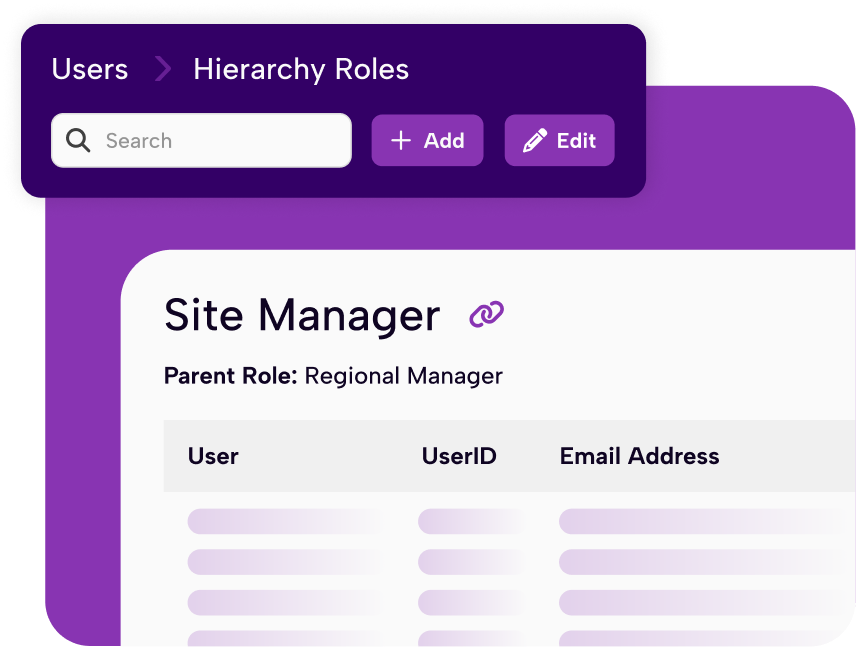
Hierarchy Roles builds your organisational structure directly into mpro5. Initiatives can be assigned by role, so tasks automatically reach the correct responsibility level, whether that’s store managers, supervisors or regional leads, without filtering or guesswork.
It also means that if someone is absent or moves on, another person in the same role can step straight in, with no tasks falling through the gaps.
Hierarchy Roles enable:
- Manager-only acknowledgements: Ensure only store managers confirm key updates.
- Supervisor-led workflows: Assign operational checks that must be completed at the right level.
- Area and regional targeting: Route specific actions to defined management tiers across your entire estate.
Together, these features change what communication and accountability look like for frontline teams.
Information reaches the right people at the right time. Critical actions are formally confirmed and every conversation connected to the work stays visible and traceable.
Most importantly, compliance becomes something you can demonstrate, rather than something you have to piece together from multiple systems.
Getting started
These features are optional but strongly recommended. Posts and Task Comments can be adopted immediately within existing workflows, with Initiatives with Sign-off and Hierarchy Roles delivering the most value with light configuration and a guided rollout.
Our team provides hands-on support to make sure adoption is smooth and value is delivered quickly.
For existing mpro5 customers, please contact your CSM directly to discuss the new features, or if you’d like to see how the new mpro5 could improve your operations, get in touch to to book a demo.
If you’re reading this, you’ve probably been here before.
An operations and compliance platform that looked great in the demo, took months to implement and still ended up sitting unused (or only half-working) while your team carried on with spreadsheets and workarounds alongside it. Maybe your business has a ‘platform graveyard’ of IT projects just like this.
The problem is, you were left with compliance software and didn’t get the right support. Most compliance platforms are sold and you’re left to figure it out.
The vendor moves on to the next deal. Your internal team, who never asked for this in the first place, gets handed a system they weren’t involved in choosing and told to make it work.
Of course, it doesn’t work. And months later you’re having a very uncomfortable conversation with the CFO about what you actually got for that investment.
What actually goes wrong after go-live
The self-serve Software As A Service (SaaS) model works well for simple tools or uncomplicated needs. For operational compliance across multiple sites with complex workflows, multiple roles and regulatory requirements that vary by location, that falls apart quickly.
Configuration happens once, during onboarding, and is never revisited. When your processes change and evolve, the platform doesn’t. When something breaks or doesn’t behave as expected, you raise a support ticket and wait. When you need a new workflow to be built for you, you’re told it’s a development request and it gets added to a queue.
Meanwhile your team has lost confidence in the system, reverted to what they know and the platform is technically live but operationally useless.
Here are some questions to ask your compliance software supplier at each stage of the process (and if they don’t have answers, come and talk to us!):
On implementation:
- Who is responsible for configuring the platform? The supplier, or our team?
- Are there additional implementation or setup fees?
- Can it be built to suit our processes, or will we have to use standard templates?
- If our processes change after implementation, who makes the changes and how do we request it?
- What does a typical implementation timeline look like for a multi-site compliance platform?
On support:
- Will we have a dedicated, named account contact or does support go through a helpdesk?
- What is the average response time for a support request?
- How proactively will you monitor our account after go-live?
On the platform itself:
- How much of the platform configuration can we manage ourselves versus relying on the supplier?
- How does the platform integrate with our existing critical business systems?
- Can my teams access it from any device, or when they don’t have internet access?
- Do our teams need training on the platform? Do you offer full training?
- Can we connect it to our sensors or IoT devices?
On reporting:
- How easy is it to get the data I need out of the platform?
- Can I manage who sees which type of data?
- Can I set up automated reports so I don’t have manual admin?
On scale:
- What happens to our contract if we need to scale the platform up or down?
- What are the most common reasons businesses switch suppliers?
On proof:
- How long does it typically take to see ROI from a compliance management platform?
- What success case studies do you have from businesses similar to ours?
With mpro5 you get a dedicated team, not a support ticket.
mpro5 is a managed service, not a software licence. That distinction matters more than any feature comparison. We offer software WITH a service.
When you go live with mpro5, you get a dedicated implementation team who configure the platform around your exact processes, not a generic template you’re expected to adapt to.
We work with you to map your workflows, build them into the system and make sure the people using it day-to-day actually understand it before you go live.
The relationship doesn’t end after implementation, either – you have a named account contact who stays with your business, monitors how the platform is performing, flags issues proactively and develops the system as your needs change.
You’ll meet with them every quarter and they’ll get to know your business inside out – making sure mpro5 evolves with your business and new challenges that arise.
They become part of your operational team rather than a random voice on a helpdesk.
From signed contract to embedded system
A typical mpro5 customer is live and seeing results within weeks, not months. The implementation team handles the heavy lifting and you don’t need a dedicated internal project resource or a technical team to get started.
Once live, you’ll be using the platform every day and you’ll probably wonder how you ever managed without it.
We deliver full training and design the platform to work in the way your teams already do – it’s the reason mpro5 customers actually embed the system into their operations rather than adapting around it.
On the question of cost
We understand that a previous bad investment makes conversations about budget harder, both for you and internally. The question worth asking is what your current situation is already costing you.
One customer’s team was spending 50 admin hours a month on paper-based compliance tasks before switching. Another came to us after an unmonitored maintenance issue resulted in a $15,000 bill that a basic workflow would have caught. A third was paying for a platform their team had stopped using, and still running manual processes alongside it.
The cost of a system that doesn’t work isn’t just the licence fee. It’s the admin hours, the audit exposure, the incidents that slip through and the management time spent compensating for a tool that was supposed to remove that burden.
Before you write off new software…
If your last platform failed, the instinct is to conclude that no platform will work, or that the pain of switching again isn’t worth it.
But it’s worth one conversation to understand whether the problem was the software or the way it was delivered. If it was the latter, mpro5 is built around a fundamentally different approach.
Speak to one of our team for an honest conversation about what you need – and whether it’s something we can help with.
Facilities Management teams are typically using up to 7 different systems every day – often logging into multiple systems before they’ve completed a single task.
While the move in recent years from over-reliance on paper forms and checklists to digitized systems has been welcome, this has also come with its own set of challenges. Multiple systems have now replaced what were once manual processes, introducing new risks to productivity, compliance and accuracy – as well as affecting the bottom line.
The typical tech stack – what are FM teams relying on?
CMMS / Work order management Often the backbone of day-to-day FM operations. CMMS systems are used to log, assign and track every reactive callout and planned maintenance job, often the first system an FM team adopts and the one everything else ends up leaning on.
CAFM / Space Management
Manages the physical estate itself, from floor plans and room bookings to space utilisation data – essential for larger or multi-site organisations trying to make the most of every square metre.
Compliance & Audit Tools
Where teams record health & safety checks, fire safety inspections or any regulatory sign-offs. Quite often, this is a patchwork of paper forms, shared drives and standalone apps.
Asset Management
Tracks the full lifecycle of every piece of equipment on site including service histories, so teams know what they’ve got, where it is and when they need to replace it.
Workforce / Scheduling Tools
Handles the people side of FM, from shift patterns to time and attendance or contractor management. Often handled by a separate system or a spreadsheet.
IoT / Building Management Systems
The eyes and ears of the building, pulling in data from sensors, HVAC systems, cameras and energy meters. These help teams to flag any issues, maintain comfortable temperature and service levels and keep running costs in check.
Reporting tools (or spreadsheets)
The glue that holds everything else together, for better or worse – usually Excel. Teams use manual exports from every other system in an attempt to give leadership a coherent picture of what’s actually going on.
The real cost of fragmented systems
While every system was implemented to address a real need, teams often find themselves in a position where systems don’t communicate with each other. Reporting becomes an exercise in managing downloads from multiple systems, with lots of manual data entry and room for error.
For head office, there’s no single source of truth. The system switching and login fatigue that comes with multiple platforms reduces the chances of busy people actually doing it. Either that data collation becomes someone’s job, or leaders rely on verbal reports that everything’s going to plan.
While multiple platforms are great at collecting their own data and holding that securely, this can also cause big compliance blind spots when audit trails are fragmented across systems. For example, if a shift leader sends a notice out to site workers over WhatsApp, there’s no data capture showing that message was received and understood.
The hidden cost of all this is hours of low-value, repetitive work across your sites with hours spent on system management and frontline teams bearing the burden of clunky work-arounds.
Why FM teams end up here
When new systems are added reactively as businesses become more complex, by solving one problem teams are unwittingly causing another.
Combined with legacy systems that are costly to replace, and the fact the procurement often happens in silos, managed by people removed from frontline teams, it’s no surprise that processes become unwieldy over time and adoption rates suffer.
What one connected platform actually looks like
Fewer systems doesn’t automatically mean less chaos, but done right, it genuinely transforms how an FM team operates day to day.
Think about what it looks like when everything lives in one place. A job comes in, whether it’s a helpdesk call, a sensor alert or a scheduled inspection, and it’s assigned, tracked and closed without anyone having to touch a second system.
Engineers turn up on site already knowing the asset history. Compliance records update as work gets done, not as a separate admin exercise at the end of the week. And managers can see what’s actually happening across their sites in real-time, from beautifully structured, visually rich dashboards.
Plus, it’s simpler for the people doing the work. One app, one login, everything they need – whether they’re on a site they know inside out or one they’ve never visited before – even if they’re on a mobile device with an unreliable connection.
Not only does it mean fewer tabs open, but it’s a way of working where information gets to the right people at the right time, without anyone having to chase it down.
How mpro5 brings all your frontline operations together
Mpro5 is designed to work across the stack – replacing the systems that are causing friction and connecting the ones that aren’t going anywhere.
Fragmented work order tools get replaced by configurable job management workflows built around how your team actually operates. Keeping everything in one place, with a full history attached.
Paper checklists and spreadsheet compliance logs become digital audits that happen as part of the normal working day. From capturing photo evidence, to signing off tasks. The audit trail builds itself so you’re always audit-ready.
Siloed asset records are replaced with connected data that links directly to maintenance schedules and job history, so your team always knows what they’re working with.
Manual scheduling and attendance tracking get upgraded to live workforce management, with NFC tags and QR codes giving real proof of presence, so you’re not relying on people remembering to log in or call in. Plus, if conditions on the ground change on the day, you can flex your schedules to fit.
Your existing infrastructure – ERP systems, IoT sensors, BMS platforms, don’t need to be ripped out and replaced. mpro5 integrates with what’s already there, pulling data into one view rather than creating yet another silo.
The management dashboard is built in. Real-time performance data, across every site, without needing a separate reporting tool or a Friday afternoon spent in Excel.
Here’s the best bit: mpro5 is fully configurable. We build your platform to your exact set of requirements with no additional implementation fees.
It’s built around your workflows, not the other way around, so it doesn’t arrive with a rigid process that your team has to adapt to. If your operation is complex or has non-standard ways of working – no problem.
To see how mpro5 could transform your Facilities Management operations, just book a demo with one of our operations experts.